



Have you ever lost your Excel worksheet password?
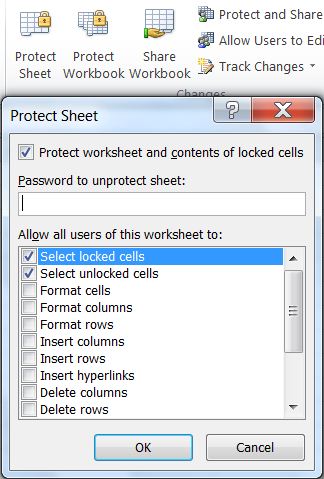
As in previous Office versions, worksheets and the workbook's structure in Excel 2007 or later are protected using a password.
To safeguard your original password against hacking, Excel does not save the user's real password inside the OpenXML file, but a cryptographic hash.
Hash algorithms are one-way functions that convert passwords to a fixed length text that cannot be reversed. Even a minor change in the source input results in a completely different output.
So when you attempt to unprotect a sheet, Excel computes the hash of the password entered against the hash of the original password stored inside the OpenXML file. If the two hashes match, the sheet is unprotected.
If you have lost your password, the only alternative short of recreating the file, is to crack the hash.
However, it is impossible to recover your exact sheet or workbook structure passwords, even if your Excel files are hacked and the hash is revealed, as hashes cannot be reversed by design.
Until Office 2010, Excel used an outdated hashing algorithm to protect our passwords. For many years, sheet protection seemed geared towards preventing accidental editing than designed to protect sheet contents from malicious tampering.
The password hash algorithm is documented in chapter 4.18.4 of the OpenOffice technical documentation and in this link. The length of the hash used until Office 2010 is just 16 bits.
Due to the short length of the hash, a lot of different passwords share the same hash. You don't seem convinced? Well, protect a worksheet using the password test and then unprotect the same worksheet using the password zzyw, BBAb or pqpp. It works, as all 4 passwords (among many other) share the hash CBEB! In cryptographic terminology, it means that this poorly designed hashing algorithm allows numerous collissions.
The workbook and worksheet passwords can be easily cracked by a brute force attack on the hashed passwords stored in Excel using VBA code. Although brute force attacks are usually computationally expensive, sheet passwords can be cracked iin seconds due to the short length of the outdated hashing algorithm..
Brute-force attacks work by trying passwords with every possible combination of characters up to a given length. A generic VBA procedure to unlock workbook & sheet passwords is listed below.
To safeguard your original password against hacking, Excel does not save the user's real password inside the OpenXML file, but a cryptographic hash.
Hash algorithms are one-way functions that convert passwords to a fixed length text that cannot be reversed. Even a minor change in the source input results in a completely different output.
So when you attempt to unprotect a sheet, Excel computes the hash of the password entered against the hash of the original password stored inside the OpenXML file. If the two hashes match, the sheet is unprotected.
If you have lost your password, the only alternative short of recreating the file, is to crack the hash.
However, it is impossible to recover your exact sheet or workbook structure passwords, even if your Excel files are hacked and the hash is revealed, as hashes cannot be reversed by design.
Until Office 2010, Excel used an outdated hashing algorithm to protect our passwords. For many years, sheet protection seemed geared towards preventing accidental editing than designed to protect sheet contents from malicious tampering.
The password hash algorithm is documented in chapter 4.18.4 of the OpenOffice technical documentation and in this link. The length of the hash used until Office 2010 is just 16 bits.
Due to the short length of the hash, a lot of different passwords share the same hash. You don't seem convinced? Well, protect a worksheet using the password test and then unprotect the same worksheet using the password zzyw, BBAb or pqpp. It works, as all 4 passwords (among many other) share the hash CBEB! In cryptographic terminology, it means that this poorly designed hashing algorithm allows numerous collissions.
The workbook and worksheet passwords can be easily cracked by a brute force attack on the hashed passwords stored in Excel using VBA code. Although brute force attacks are usually computationally expensive, sheet passwords can be cracked iin seconds due to the short length of the outdated hashing algorithm..
Brute-force attacks work by trying passwords with every possible combination of characters up to a given length. A generic VBA procedure to unlock workbook & sheet passwords is listed below.
'http://superuser.com/questions/45868/recover-sheet-protection-password-for-and-excel-sheet

Sub PasswordBreaker()

  'Author unknown

  Dim i As Integer, j As Integer, k As Integer
  Dim l As Integer, m As Integer, n As Integer
  Dim i1 As Integer, i2 As Integer, i3 As Integer
  Dim i4 As Integer, i5 As Integer, i6 As Integer

  On Error Resume Next

  For i = 65 To 66: For j = 65 To 66: For k = 65 To 66
  For l = 65 To 66: For m = 65 To 66: For i1 = 65 To 66
  For i2 = 65 To 66: For i3 = 65 To 66: For i4 = 65 To 66
  For i5 = 65 To 66: For i6 = 65 To 66: For n = 32 To 126

  ActiveSheet.Unprotect Chr(i) & Chr(j) & Chr(k) & _
      Chr(l) & Chr(m) & Chr(i1) & Chr(i2) & Chr(i3) & _
      Chr(i4) & Chr(i5) & Chr(i6) & Chr(n)

  If ActiveSheet.ProtectContents = False Then

      MsgBox "One usable password is " & Chr(i) & Chr(j) & _
          Chr(k) & Chr(l) & Chr(m) & Chr(i1) & Chr(i2) & _
          Chr(i3) & Chr(i4) & Chr(i5) & Chr(i6) & Chr(n)

      ActiveWorkbook.Sheets(1).Select

      Range("a1").FormulaR1C1 = Chr(i) & Chr(j) & _
          Chr(k) & Chr(l) & Chr(m) & Chr(i1) & Chr(i2) & _
          Chr(i3) & Chr(i4) & Chr(i5) & Chr(i6) & Chr(n)

      Exit Sub

  End If

  Next: Next: Next: Next: Next: Next
  Next: Next: Next: Next: Next: Next

End Sub
A popular sheet password breaking VBA procedure of an unknown author
Republished for demo purposes
Republished for demo purposes
OpenXML files are essentially zipped containers. Rename the extension of any .xlsx / .xlsm / .xlsb or .xlam Excel file to .zip. You will find several files with XML code inside the ZIP archive.
An alternative method for removing sheet protection is to edit sheet XML files and remove the sheetProtection node. I won't go into detail on how to achieve this, as the workbook can be easily corrupted by even a minor XML coding mistake.
I strongly recommend using a purpose made Add-in for removing protection passwords. Please read about our Password Protection Remover add-in here.
An alternative method for removing sheet protection is to edit sheet XML files and remove the sheetProtection node. I won't go into detail on how to achieve this, as the workbook can be easily corrupted by even a minor XML coding mistake.
I strongly recommend using a purpose made Add-in for removing protection passwords. Please read about our Password Protection Remover add-in here.
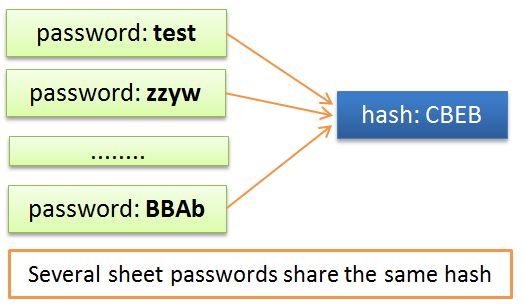

Sheet password shown hashed in Excel 2007-2010
The above examples are provided for informational purposes only and to create awareness that protection in Excel may not be a reliable method of securing data. Sheet passwords offer little more than protection against accidental damage or uninformed tinkering.
Any information in a workbook that other people are not really allowed to see, should not be in the workbook before making it available to them.
Read next: How sheet and workbook protection was strengthened in Excel 2013!
Any information in a workbook that other people are not really allowed to see, should not be in the workbook before making it available to them.
Read next: How sheet and workbook protection was strengthened in Excel 2013!
For our Excel workbook & worksheet Password Protection Remover Add-in:
CLICK HERE
