




Reverse Pivoted Data to a Database Table (unPivot Addin)
Free Unpivot Excel Addin with full functionality will be released early Oct 2013
The problem
Most analysis and visualization tools, such as Tableau, R, Protovis etc, cannot read pivoted data, such as shown in the cross table below. Analysts have to spend considerable time in manipulating and transforming the data, before they are able to derive any meaningful results from it.
The solution: Unpivot
Our Excel Unpivot Addin allows users to transform large data sets into data tables. Similar to the Unpivot relational operator in SQL Server, the Excel Addin performs almost the reverse operation of PivotTables by rotating columns into rows.
Please note that Unpivot cannot reproduce the original detailed values behind the pivoted data. It only converts summary values to a data table.
Most analysis and visualization tools, such as Tableau, R, Protovis etc, cannot read pivoted data, such as shown in the cross table below. Analysts have to spend considerable time in manipulating and transforming the data, before they are able to derive any meaningful results from it.
The solution: Unpivot
Our Excel Unpivot Addin allows users to transform large data sets into data tables. Similar to the Unpivot relational operator in SQL Server, the Excel Addin performs almost the reverse operation of PivotTables by rotating columns into rows.
Please note that Unpivot cannot reproduce the original detailed values behind the pivoted data. It only converts summary values to a data table.
|
Date headers appear as discrete pivot fields during Excel PivotTable set-up,
if cross tabulated data is used. |
A data table (in database format) can be used to
create easily any type of Excel PivotTable or PivotChart |
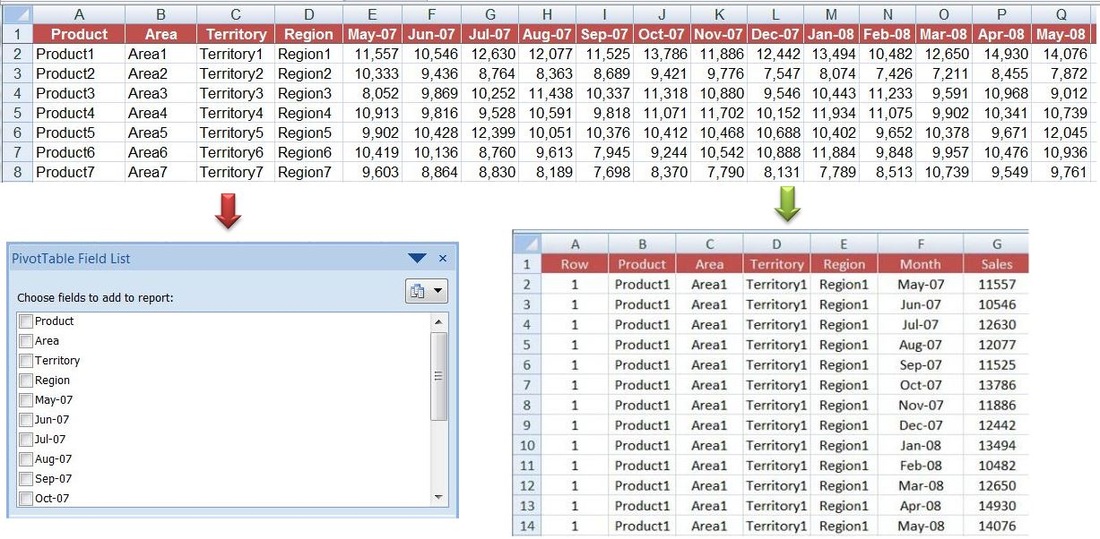
The above demo table lists sales data for products in various locations by month. The data is shown in pivoted and not in database format. Date headers appear as discrete pivot fields during pivot table set-up, making configuration and filtering by date much more difficult (field list on the top-left example), especially when data for several years is available.
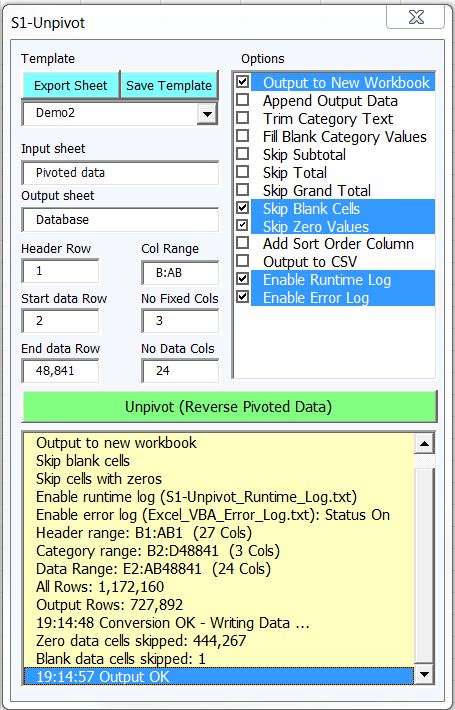
Our proposed solution is to convert pivoted data using our VBA utility, which can create a database table with up to 1+ million rows in seconds (userform and database table shown below).
The conversion utility can accommodate any number of fixed columns to the left the data and a header row that is not immediately above the data.
Column A in the database (see below) lists the row number of the input table. This information is useful when a pivot table is created from the new database table and rows should be sorted according the original sort order, for example when converting financial statements: multi-year balance sheet, as shown below.
Additional conversion utility features:
The conversion utility can accommodate any number of fixed columns to the left the data and a header row that is not immediately above the data.
Column A in the database (see below) lists the row number of the input table. This information is useful when a pivot table is created from the new database table and rows should be sorted according the original sort order, for example when converting financial statements: multi-year balance sheet, as shown below.
Additional conversion utility features:
- The output sheet with normalized data could be created in the existing or in a new workbook.
- VBA code is optimized for fast performance.
- The input parameters can be saved as a named template for future use on identical spreadsheets.
- Blank and/or zero cells could be excluded from the output database.
- Optional output to a CSV file.
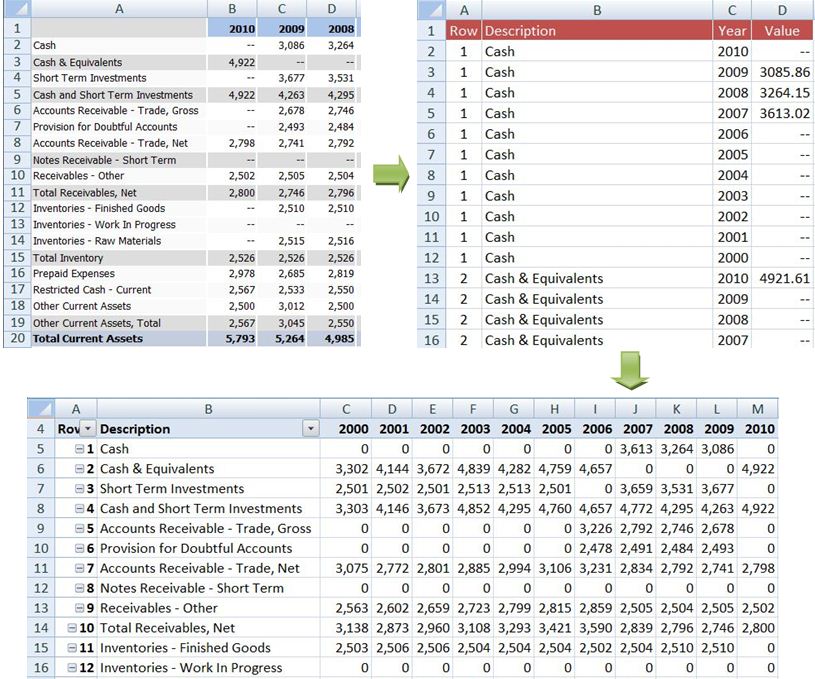
unPivoting or reShaping a Balance Sheet statement:
Cross-tab data are converted to a database from which any pivot can be created
Cross-tab data are converted to a database from which any pivot can be created
The function returns the number of data rows created, if any. When combined with a procedure that scans files in disk subfolders, hundreds of Excel files (e.g. financial statements) can be opened and converted into a single database table automatically. Output could be written to .csv file to bypass the 1.05 million row limit of Excel worksheets.
Tableau doesn't like pivoted or cross tabulated data either ! To make the most out of Tableau, the data has to be reshaped and the proposed method is a powerful online tool called Data Wrangler.
Although Data Wrangler is an interactive tool for data cleaning and transformation, which can manipulate data sets shaped in multiple formats, I can immediately see some disadvantages with it compared to the above Excel VBA utility:
Tableau doesn't like pivoted or cross tabulated data either ! To make the most out of Tableau, the data has to be reshaped and the proposed method is a powerful online tool called Data Wrangler.
Although Data Wrangler is an interactive tool for data cleaning and transformation, which can manipulate data sets shaped in multiple formats, I can immediately see some disadvantages with it compared to the above Excel VBA utility:
- Confidentiality concerns as your private data should be posted online.
- A potential calculation overhead for large data sets or repetitive conversions.
- An initial learning curve, as is the case with any powerful interactive data transformation tool.
